Salesforce
ServiceNow

Download Case Study

Download Case Study
Register to read the complete solution and benefits of this Case Study as a PDF on your email.

Table of Contents
The Salesforce ecosystem is growing fast, and so is the need for skilled Salesforce experts. But finding the right talent, at the right time, is still a major challenge for consulting partners, ISVs, and Salesforce customers.
That’s where Salesforce staff augmentation can make a great difference.
You won’t need to spend months hiring, training, and onboarding full-time employees; you can hire certified Salesforce experts when you need them. No delays, no overhead, just the right skillsets matched to the right project.
The biggest benefit is that it helps you save costs in measurable ways.
Here on this blog, we’ll help you understand all about Salesforce staff augmentation, its benefits, and how it might help you save costs.
Salesforce staff augmentation is a flexible hiring model where you bring in external Salesforce professionals to work alongside your internal team for a specific project or period.
Think of it like renting expertise on-demand, rather than buying full-time. The professional integrates into your team, reports to your project manager, and works on your goals.
Salesforce staff augmentation can be used to fill all experience levels, including:
You can hire one professional, or you can build an entire augmented team of Salesforce professionals working with your in-house teams.
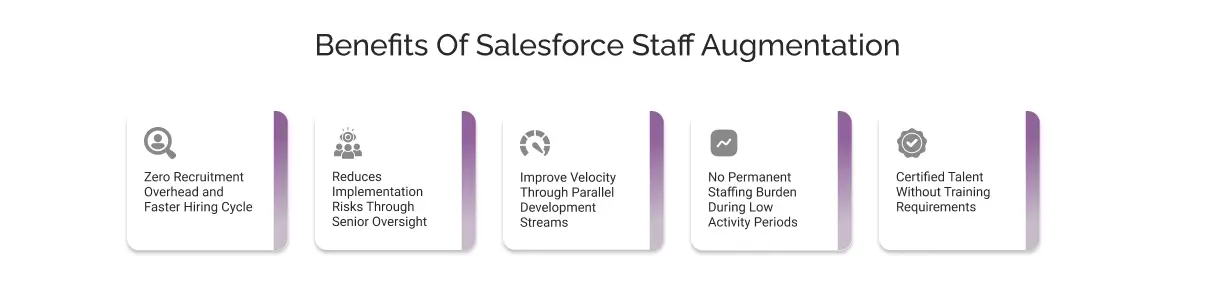
The process to hire a Salesforce developer or even another professional is lengthy and expensive. The recruitment process includes a lot of steps, such as screening, technical assessments, background verifications, job advertisements, and HR time adds up. Additionally, this time increases when you are looking for highly experienced roles such as Salesforce architects.
However, staff augmentation allows you to hire talented Salesforce experts instantly when a project peaks and reduces the team size when the workload drops. Put simply, you will have access to the right talent at the right time, and only for the duration needed, safeguarding you from keeping bench resources on payroll.
Salesforce staff augmentation benefits the most when your internal team needs senior oversight, for example, an architect or a technical lead who can validate solutions, review designs, and ensure technical proficiency of the project.
Augmenting senior talent will help you have the senior oversight on your project immediately, ensuring you meet data architecture, integration patterns, automation logic, and fix performance impacts before issues occur.
This will help you to save a lot of money on rework, redesigns, and production issues later. Additionally, you will be able to ensure that your project aligns with Salesforce best practices.
Salesforce consulting partners, due to a lack of expertise, often work sequentially. So, when you choose staff augmentation to augment your team, you can run multiple workstreams in parallel, such as:
This significantly reduces delivery time without compromising the quality.
The stream of the project doesn’t always stay the same throughout the year. For example, an organization might experience a high workload during the implementation phase, but during maintenance, the workload goes down.
So, when you are choosing Salesforce staff augmentation, you are only paying for the expertise needed and for the time period needed. Additionally, you are no longer entitled to pay monthly salary, insurance, and other benefits.
This will help you with the following benefits:
Salesforce CRM believes in continuous improvement in the form of three releases a year, new security guidelines, API changes, and updated best practices.
You can augment Salesforce experts from IT staff augmentation companies who are up-to-date with the latest knowledge, fully trained on the latest Salesforce features, and the cloud. Therefore, you will have a team that is production-ready from day one without asking you to spend time or money on training, certifications, or internal skill upgrades.
Salesforce staff augmentation costs are not fixed; they vary depending on multiple factors. This guide will help you understand all the factors that have an important role in deciding staff augmentation costs.
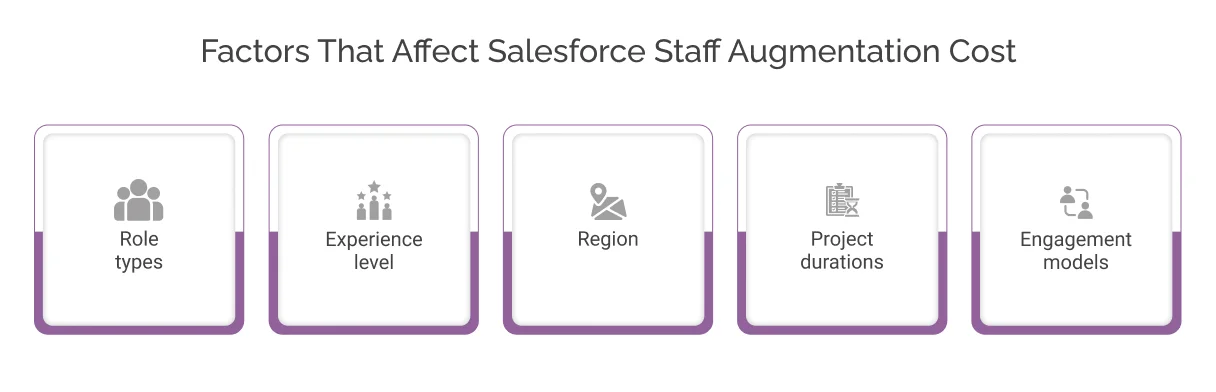
Several factors influence the cost, including but not limited to the following:
Different Salesforce roles have different costs. For example, a Salesforce admin costs less than an architect.
Put simply, more specialized roles require more specialized skills; therefore, the hourly rate increases.
Experience is one of the most obvious and major drivers of the cost. Junior professionals with 1-3 years of experience can work at lower price rates, while mid-level experts with 3-5 years of experience cost more. Senior consultants in the role of architect and consultants are at the premium end.
The geographical region has a significant impact on the Salesforce staffing cost.
Onshore talent (US, UK) comes at a premium because labor costs are higher. Nearshore options (Latin America, Canada) offer better value. Offshore resources (India, Eastern Europe) are the most cost-effective, though they may involve time zone differences.
The duration of the project puts you in the right spot to negotiate the cost. For example, the longer the project is, the lower the cost would be, thanks to the discounted prices and cost efficiency. Vice versa, for short-term contracts, you might have to pay more.
Salesforce staff augmentation often offers different engagement models. For example, dedicated teams (professionals working exclusively for you) are typically higher than time-and-materials models. Fixed-price engagements shift risk differently from hourly billing.
Here’s what you can expect to pay across different regions and roles. These are average hourly rates as of 2026:
| Region | Developer | Architect | Quality Analyst | Business Analyst |
| US/UK (Onshore) | $90–$150/hr | $140–$200/hr | $50–$90/hr | $70–$120/hr |
| Latin America (Nearshore) | $45–$70/hr | $70–$110/hr | $30–$50/hr | $40–$70/hr |
| India (Offshore) | $25–$50/hr | $50–$80/hr | $20–$35/hr | $25–$40/hr |
Based on this average hourly price estimation, a 3-month project requiring a senior Developer could cost you $57,600 onshore (based on 160 hours/month at $120/hr average) or $28,800 nearshore at the same hours. That’s a significant difference.

When hiring full-time employees, the cost goes beyond the salaries. Here we have compiled a list of the hidden costs that are unavoidable with full-time employees and might help you to save them when working with augmented staff.
Traditional recruitment often costs 15-25% of the annual salary of the employees. This cost includes recruiters, job posting fees, interview coordination, and background checks.
When you choose staff augmentation, all of these costs are saved; the staffing partner handles everything from recruitment to vetting.
On average, new full-time hires need 2-4 weeks of onboarding and ramp-up time. They need training on your systems, your processes, and your culture, losing productivity and paying training costs.
Augmented professionals are experienced, and they can contribute to your project from the very first. They are certified and experienced, so there will be no training cost involved.
A full-time developer in the US averages $120,000-$150,000 annually, plus 25-30% in benefits (health insurance, retirement, taxes). Over three years, that’s $450,000-$585,000 per person. If your project needs them for only one year, you’re still paying for three.
With augmentation, you pay only for the time you actually use.
The availability of Salesforce talent varies across different regions. For example, if you consider nearshore sourcing from the US or the UK, you might have to pay a high price. Similarly, if you are hired from other countries like India, you might have to access experienced professionals at affordable prices.
Here is an explanation of how price differs across regions and why:
So, it is suggested that you should evaluate talent availability across regions rather than hiring based on proximity alone, as they discover more competitive options with a greater skill level. Explore all the geographical options available and compare them based on price to choose the most feasible and cost-effective option.
Many companies overspend because they hire augmented resources without clearly understanding what skills they actually lack. Therefore, it is best practice to work on creating a skill map that includes information like what your project needs vs. what your team already has.
For example:
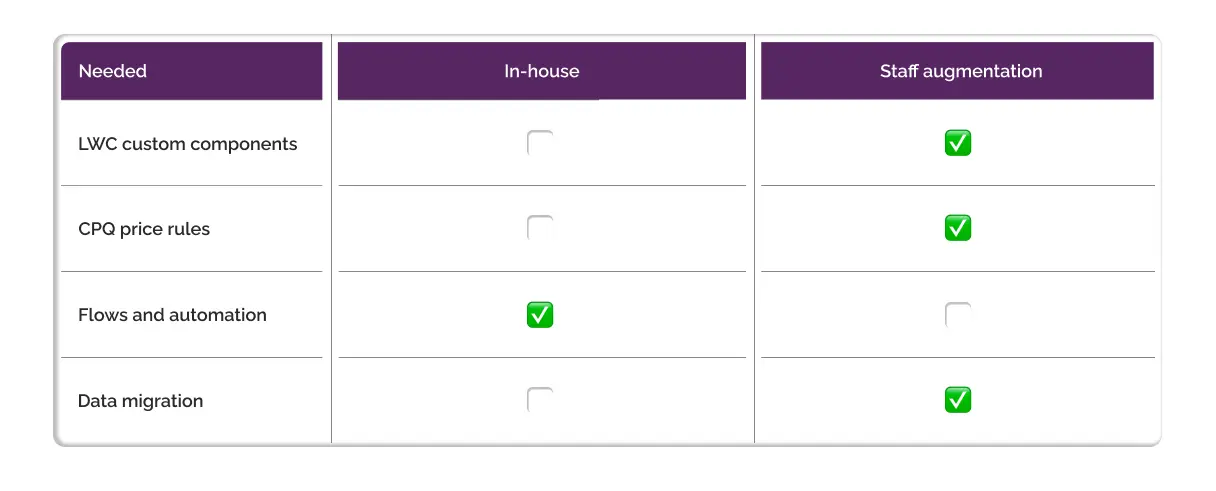
The skill map will save you from hiring for unnecessary roles that can be handled easily by the in-house team. Additionally, you will be paying only for the experts where gaps exist, and ensure that the right expert is working on the project.
As we have said earlier, the cost of IT staff augmentation varies according to different regions. Therefore, you should consider choosing the right augmentation model from onshore, nearshore, or offshore according to your need for client-facing and development-heavy work.
For example, you can choose an onshore model to hire business analysts and other professionals who are involved in client communication. Similarly, for roles such as developer, analyst, QA, or other roles, you can choose an offshore model.
How does this approach save cost?
IT staff augmentation has different pricing models, such as time & material vs fixed price contracts. Each model has its own benefits and drawbacks. For example, if you have an unpredictable workload, you can choose the time & material model, or a similar fixed price when the workload is steady, and you need a predictable budget.
Vet each model against your needs and choose the one that seems to be most profitable for your business needs.
Instead of maintaining a large in-house Salesforce team, hire only for the essential roles, typically admins, internal product owners, and business-facing analysts. Use augmented developers, architects, testers, and integration experts to scale up only when projects require additional expertise.
This hybrid model reduces fixed payroll costs while giving you the flexibility to onboard specialized skills whenever needed. It’s the model most Salesforce consulting partners and ISVs use to stay competitive without carrying an expensive year-round workforce.
Salesforce projects often need the right expertise at the right time to get all things completed. Smart IT Staff is a trusted Salesforce staffing company. We have a team of vetted, certified Salesforce professionals, allowing us to scale quickly and control costs effectively.
Whether you’re a consulting partner, an ISV, or a Salesforce customer, Smart IT Staff helps you bridge skill gaps quickly and keep your projects moving without budget strain

Pricing varies based on expertise and location:
When you hire full-time employees, you're committing to ongoing payroll, benefits, recruitment costs, and keeping people on the bench even when project work slows down. Staff augmentation flips that model. You bring in certified Salesforce professionals exactly when your workload peaks and scale back when things quiet down. That means you're only paying for expertise during the periods you actually need it, which gives you much better control over your project budget throughout the year.
Yes. Bringing in senior oversight like architects, solution leads, or technical reviewers helps you validate designs, strengthen integration patterns, and catch issues early before they turn into costly rework later in the project.
The most common roles are specialized positions that are expensive to keep in-house full-time: Salesforce Developers, Admins, B2B/B2C Commerce experts, Marketing Cloud, Tableau, MuleSoft and Data Cloud specialists, AI/Einstein consultants, QA testers, and integration engineers.
Access a team of certified IT professionals.
Let us know the skills you want to augment your organization, and we’ll help you fill the skill gap rapidly.

By submitting the form, you consent to Smart IT Staff processing your information in accordance with the Privacy Policy. Your information is safe with us, and we will use it for the intended purposes only. You can opt out of email updates at any time.